COMMON PC COMPONENTS
This table lists all of the common computer components, what they connect to and what they are used for.
#
COMPONENT
PURPOSE
1.
Motherboard
The motherboard or mainboard is the main circuitboard which interconnects to all other components. The motherboard allows communication and power to flow throughout the computer system.
2.
Processor (CPU)
The Central Processing Unit (CPU) is the brain of the computer system. This is the part of the computer which processes all inputs and decides how they will be outputed.
3.,
Memory (RAM)
Random Access Memory (RAM) is your computers short term memory and enables the computer system to perform multitasking functions such as copy and paste or type information into a word document without it saving.
4.
Video/Graphics Card
The Video/Graphics Card is responsible for receiving visual inputs and displaying (outputing) all visual data. Graphics processing has a very difficult task which is why modern graphics cards now have Graphics Processor Units (GPU) which work like a CPU but for visual data only. This allows quicker rendering of 3D images and streaming of high definition video and leaves the CPU free to work on all other data.
5.
Network Interface Card (NIC)
The Network Interface Card (NIC) allows your computer system to communicate and pass data to other computer systems within a Local Area Network (LAN) or over the internet to Wide Area Networks (WAN).
6.
Hard Drive (HDD)
The Hard Drive (HDD) is the long term storage for your computer system. Hard Drives are used to archive and store data for future retreival.
7.
CD/DVD Drive (ROM)
The CD/DVD ROM Drive allows your computer system to read data from external media like CDs and DVDs. Generally there are two types of CD/DVD ROM; readers and writers (burners).
8.
Sound Card
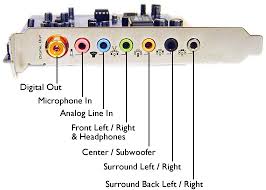
The Sound Card allows for the input (Microphones) and output (Speakers) of audio related data
MOTHER BOARD
A motherboard is the central printed circuit board (PCB) in many modern computers and holds many of the crucial components of the system, while providing connectors for other peripherals. The motherboard can be easily compared to the human body’s nervous system. The wires (nerves) on it transfer data between all of the other components. The motherboard is also known as the main board, system board or in Apple comptuers the logic board. It is also sometimes casually refered to as the mobo.

PROCESSOR/CPU
PROCESSOR/CPU
The processor is the brain of the computer and is responsible for processing the instructions set out by the computer program or from the users input. The central processing unit carries out each instruction on the program in sequence, to perform the basic arithmetical, logical, and input/output operations of the system. The architecture of CPU chips have dramatically changed since their first inception in the early 1960s, however, their fundamental operation remains much the same.

MEMORY/RAM
Random Access Memory (RAM) is the best known form of computer memory. RAM is considered “random access” because you can access any memory cell directly if you know the row and column that interext at that cell. Most RAM that is installed on computers can only function when the computer is powered. RAM is needed for your computer whenever you decide to perform an operation. For example if you wanted to do word processing on your computer. All the letters that you type are going into a temporary file that is stored in the RAM. If your computer shuts down in the middle of your document creation and you powered it back up, most likely your information would be lost. This is because it was stored in RAM. Had you saved the document it would have been stored onto another type of memory called ROM, or Read-Only Memory.

NETWORK CARD
The Network Interface Card/Controller (NIC) is a computer hardware component that connects to a computer network. The controller may also be referrred to as a network adapater, or a LAN adapter. It is commonly implemented on expansion cards that plug into a computer bus and known as a network interface card, network card or LAN card. However the low cost and ubiquity of the Ethernet standard measn that most newer computers have a netwrok interface built into the motherboard.
HARD DRIVE
The hard drive disk (HDD) is a non-volatile storage device that stores digitally encoded data on rapidly rotating rigid (i.e. hard) plates with magnetic surfaces. Simply meaning that the hardware holds a spinning magnet or opitical disk and reads and writes data on it. As hard drives spin (usually) between 5,000 RPM and 10,000 RPM they create friction, use large amount of power, are slow to get up and running and create large amounts of heat. For this reason traditional spinning disks are slowly being replaced with flash memory solutions such as Solid State Hard Drives (SSD).

VIDEO CARD
This component is used to transfer data to your monitor so that it ca be displayed. The more RAM you have in a video card usually increases the performance of graphic heavy applications such as games. Video cards are also refered to as Graphics Cards and Display Cards.

SOUND CARD
A sound card (also known as an audi card) is a computer expansion card that facilitates the input and output of audio signals to and from a computer under control of computer programs.
MEMORY/RAM
Random Access Memory (RAM) is the best known form of computer memory. RAM is considered “random access” because you can access any memory cell directly if you know the row and column that interext at that cell. Most RAM that is installed on computers can only function when the computer is powered. RAM is needed for your computer whenever you decide to perform an operation. For example if you wanted to do word processing on your computer. All the letters that you type are going into a temporary file that is stored in the RAM. If your computer shuts down in the middle of your document creation and you powered it back up, most likely your information would be lost. This is because it was stored in RAM. Had you saved the document it would have been stored onto another type of memory called ROM, or Read-Only Memory.
NETWORK CARD
The Network Interface Card/Controller (NIC) is a computer hardware component that connects to a computer network. The controller may also be referrred to as a network adapater, or a LAN adapter. It is commonly implemented on expansion cards that plug into a computer bus and known as a network interface card, network card or LAN card. However the low cost and ubiquity of the Ethernet standard measn that most newer computers have a netwrok interface built into the motherboard.
HARD DRIVE
The hard drive disk (HDD) is a non-volatile storage device that stores digitally encoded data on rapidly rotating rigid (i.e. hard) plates with magnetic surfaces. Simply meaning that the hardware holds a spinning magnet or opitical disk and reads and writes data on it. As hard drives spin (usually) between 5,000 RPM and 10,000 RPM they create friction, use large amount of power, are slow to get up and running and create large amounts of heat. For this reason traditional spinning disks are slowly being replaced with flash memory solutions such as Solid State Hard Drives (SSD).
VIDEO CARD
This component is used to transfer data to your monitor so that it ca be displayed. The more RAM you have in a video card usually increases the performance of graphic heavy applications such as games. Video cards are also refered to as Graphics Cards and Display Cards.
SOUND CARD
A sound card (also known as an audi card) is a computer expansion card that facilitates the input and output of audio signals to and from a computer under control of computer programs.

No comments:
Post a Comment