Thursday, 19 December 2013
Advantages of Computer
Advantages of Computer
Computer has made a very vital impact on society. It has changed the way of life.
The use of computer technology has affected every field of life. People are using computers to perform different tasks quickly and easily. The use of computers makes different task easier. It also saves time and effort and reduces the overall cost to complete a particular task.
Many organizations are using computers for keeping the records of their customers. Banks are using computers for maintaining accounts and managing financial transactions. The banks are also providing the facility of online banking. The customers can check their account balance from using the internet. They can also make financial transaction online. The transactions are handled easily and quickly with computerized systems.
People are using computers for paying their bills, managing their home budgets or simply having some break and watching a movie, listening to songs or playing computer games. Online services like skype or social media websites are used for communication and information sharing purposes.
Computer can be used as a great educational tool. Students can have access to all sort of information on the internet. Some great websites like Wikipedia, Khan’s Academy, Code Academy, Byte-Notes provides free resources for students & professionals.
Moreover, the computer is being used in every field of life such as medical, business, industry, airline and weather forecasting.

Wednesday, 18 December 2013
PC COMPONENTS
COMMON PC COMPONENTS
This table lists all of the common computer components, what they connect to and what they are used for.
#
COMPONENT
PURPOSE
1.
Motherboard
The motherboard or mainboard is the main circuitboard which interconnects to all other components. The motherboard allows communication and power to flow throughout the computer system.
2.
Processor (CPU)
The Central Processing Unit (CPU) is the brain of the computer system. This is the part of the computer which processes all inputs and decides how they will be outputed.
3.,
Memory (RAM)
Random Access Memory (RAM) is your computers short term memory and enables the computer system to perform multitasking functions such as copy and paste or type information into a word document without it saving.
4.
Video/Graphics Card
The Video/Graphics Card is responsible for receiving visual inputs and displaying (outputing) all visual data. Graphics processing has a very difficult task which is why modern graphics cards now have Graphics Processor Units (GPU) which work like a CPU but for visual data only. This allows quicker rendering of 3D images and streaming of high definition video and leaves the CPU free to work on all other data.
5.
Network Interface Card (NIC)
The Network Interface Card (NIC) allows your computer system to communicate and pass data to other computer systems within a Local Area Network (LAN) or over the internet to Wide Area Networks (WAN).
6.
Hard Drive (HDD)
The Hard Drive (HDD) is the long term storage for your computer system. Hard Drives are used to archive and store data for future retreival.
7.
CD/DVD Drive (ROM)
The CD/DVD ROM Drive allows your computer system to read data from external media like CDs and DVDs. Generally there are two types of CD/DVD ROM; readers and writers (burners).
8.
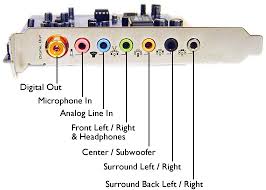
Sound Card
The Sound Card allows for the input (Microphones) and output (Speakers) of audio related data
MOTHER BOARD
A motherboard is the central printed circuit board (PCB) in many modern computers and holds many of the crucial components of the system, while providing connectors for other peripherals. The motherboard can be easily compared to the human body’s nervous system. The wires (nerves) on it transfer data between all of the other components. The motherboard is also known as the main board, system board or in Apple comptuers the logic board. It is also sometimes casually refered to as the mobo.

PROCESSOR/CPU
PROCESSOR/CPU
The processor is the brain of the computer and is responsible for processing the instructions set out by the computer program or from the users input. The central processing unit carries out each instruction on the program in sequence, to perform the basic arithmetical, logical, and input/output operations of the system. The architecture of CPU chips have dramatically changed since their first inception in the early 1960s, however, their fundamental operation remains much the same.

MEMORY/RAM
Random Access Memory (RAM) is the best known form of computer memory. RAM is considered “random access” because you can access any memory cell directly if you know the row and column that interext at that cell. Most RAM that is installed on computers can only function when the computer is powered. RAM is needed for your computer whenever you decide to perform an operation. For example if you wanted to do word processing on your computer. All the letters that you type are going into a temporary file that is stored in the RAM. If your computer shuts down in the middle of your document creation and you powered it back up, most likely your information would be lost. This is because it was stored in RAM. Had you saved the document it would have been stored onto another type of memory called ROM, or Read-Only Memory.

NETWORK CARD
The Network Interface Card/Controller (NIC) is a computer hardware component that connects to a computer network. The controller may also be referrred to as a network adapater, or a LAN adapter. It is commonly implemented on expansion cards that plug into a computer bus and known as a network interface card, network card or LAN card. However the low cost and ubiquity of the Ethernet standard measn that most newer computers have a netwrok interface built into the motherboard.
HARD DRIVE
The hard drive disk (HDD) is a non-volatile storage device that stores digitally encoded data on rapidly rotating rigid (i.e. hard) plates with magnetic surfaces. Simply meaning that the hardware holds a spinning magnet or opitical disk and reads and writes data on it. As hard drives spin (usually) between 5,000 RPM and 10,000 RPM they create friction, use large amount of power, are slow to get up and running and create large amounts of heat. For this reason traditional spinning disks are slowly being replaced with flash memory solutions such as Solid State Hard Drives (SSD).

VIDEO CARD
This component is used to transfer data to your monitor so that it ca be displayed. The more RAM you have in a video card usually increases the performance of graphic heavy applications such as games. Video cards are also refered to as Graphics Cards and Display Cards.

SOUND CARD
A sound card (also known as an audi card) is a computer expansion card that facilitates the input and output of audio signals to and from a computer under control of computer programs.
MEMORY/RAM
Random Access Memory (RAM) is the best known form of computer memory. RAM is considered “random access” because you can access any memory cell directly if you know the row and column that interext at that cell. Most RAM that is installed on computers can only function when the computer is powered. RAM is needed for your computer whenever you decide to perform an operation. For example if you wanted to do word processing on your computer. All the letters that you type are going into a temporary file that is stored in the RAM. If your computer shuts down in the middle of your document creation and you powered it back up, most likely your information would be lost. This is because it was stored in RAM. Had you saved the document it would have been stored onto another type of memory called ROM, or Read-Only Memory.
NETWORK CARD
The Network Interface Card/Controller (NIC) is a computer hardware component that connects to a computer network. The controller may also be referrred to as a network adapater, or a LAN adapter. It is commonly implemented on expansion cards that plug into a computer bus and known as a network interface card, network card or LAN card. However the low cost and ubiquity of the Ethernet standard measn that most newer computers have a netwrok interface built into the motherboard.
HARD DRIVE
The hard drive disk (HDD) is a non-volatile storage device that stores digitally encoded data on rapidly rotating rigid (i.e. hard) plates with magnetic surfaces. Simply meaning that the hardware holds a spinning magnet or opitical disk and reads and writes data on it. As hard drives spin (usually) between 5,000 RPM and 10,000 RPM they create friction, use large amount of power, are slow to get up and running and create large amounts of heat. For this reason traditional spinning disks are slowly being replaced with flash memory solutions such as Solid State Hard Drives (SSD).
VIDEO CARD
This component is used to transfer data to your monitor so that it ca be displayed. The more RAM you have in a video card usually increases the performance of graphic heavy applications such as games. Video cards are also refered to as Graphics Cards and Display Cards.
SOUND CARD
A sound card (also known as an audi card) is a computer expansion card that facilitates the input and output of audio signals to and from a computer under control of computer programs.
COMPUTER HISTORY AND ITS GENERATIONS
COMPUTER HISTORY AND ITS GENERATIONS
The Five Generations of Computers
First Generation (1940-1956) Vacuum Tubes
The first computers used vacuum tubes for circuitry and magnetic drums for memory, and were often enormous, taking up entire rooms. They were very expensive to operate and in addition to using a great deal of electricity, generated a lot of heat, which was often the cause of malfunctions.
First generation computers relied on machine language, the lowest-level programming language understood by computers, to perform operations, and they could only solve one problem at a time. Input was based on punched cards and paper tape, and output was displayed on printouts.
The UNIVAC and ENIAC computers are examples of first-generation computing devices. The UNIVAC was the first commercial computer delivered to a business client, the U.S. Census Bureau in 1951.
Second Generation (1956-1963) Transistors
Transistors replaced vacuum tubes and ushered in the second generation of computers. The transistor was invented in 1947 but did not see widespread use in computers until the late 1950s. The transistor was far superior to the vacuum tube, allowing computers to become smaller, faster, cheaper, more energy-efficient and more reliable than their first-generation predecessors. Though the transistor still generated a great deal of heat that subjected the computer to damage, it was a vast improvement over the vacuum tube. Second-generation computers still relied on punched cards for input and printouts for output.
Second-generation computers moved from cryptic binary machine language to symbolic, or assembly, languages, which allowed programmers to specify instructions in words. High-level programming languages were also being developed at this time, such as early versions of COBOL and FORTRAN. These were also the first computers that stored their instructions in their memory, which moved from a magnetic drum to magnetic core technology.
The first computers of this generation were developed for the atomic energy industry.
Third Generation (1964-1971) Integrated Circuits
The development of the integrated circuit was the hallmark of the third generation of computers. Transistors were miniaturized and placed on silicon chips, called semiconductors, which drastically increased the speed and efficiency of computers.
Instead of punched cards and printouts, users interacted with third generation computers through keyboards and monitors and interfaced with an operating system, which allowed the device to run many different applications at one time with a central program that monitored the memory. Computers for the first time became accessible to a mass audience because they were smaller and cheaper than their predecessors.
Fourth Generation (1971-Present) Microprocessors
The microprocessor brought the fourth generation of computers, as thousands of integrated circuits were built onto a single silicon chip. What in the first generation filled an entire room could now fit in the palm of the hand. The Intel 4004 chip, developed in 1971, located all the components of the computer—from the central processing unit and memory to input/output controls—on a single chip.
In 1981 IBM introduced its first computer for the home user, and in 1984 Apple introduced the Macintosh. Microprocessors also moved out of the realm of desktop computers and into many areas of life as more and more everyday products began to use microprocessors.
As these small computers became more powerful, they could be linked together to form networks, which eventually led to the development of the Internet. Fourth generation computers also saw the development of GUIs, the mouse and handheld devices.
Fifth Generation (Present and Beyond) Artificial Intelligence
Fifth generation computing devices, based on artificial intelligence, are still in development, though there are some applications, such as voice recognition, that are being used today. The use of parallel processing and superconductors is helping to make artificial intelligence a reality.Quantum computation and molecular and nanotechnology will radically change the face of computers in years to come. The goal of fifth-generation computing is to develop devices that respond to natural language input and are capable of learning and self-organization.
Subscribe to:
Comments (Atom)